It’s Always DNS: A Practical Introduction
DNS is invisible when it works and frustrating when it doesn’t. This guide explains how it powers home Internet, domains, and Internet services.


There is an old saying in system administration: “It’s always DNS.” Whenever a service goes down or a website refuses to load, veterans know the problem often lies in the Domain Name System. The reason is simple. DNS is one of the most critical components of the Internet, quietly translating names into numbers so that devices can communicate.
Yet DNS is also invisible. When everything works, nobody notices it exists. When it fails, the entire Internet seems broken. This article explores DNS from three perspectives: what is provides to home users, what it means to purchase a domain, and how Internet services rely on it.
DNS at Home
For most home users, DNS is something that just works. The Internet service provider automatically assigns a DNS server when the modem connects, and most people never think to change it. Yet DNS plays a crucial role in how every device on the network reaches websites, applications, and services.
At its core, DNS translates human-friendly names, like technodabbler.com, into the numerical IP addresses that computers use to communicate. Without this translation, every visit to a website would require remembering a long string of numbers.
Most home networks list two DNS servers in their configuration. This is not for speed but for redundancy. If the primary DNS server becomes unreachable, the secondary ensures that requests can still be resolved. In practice, this simple backup system is part of what makes DNS feel invisible: even when something goes wrong, the Internet still appears to function.
Changing DNS settings can also reshape the browsing experience. Some providers, such as OpenDNS or AdGuard DNS, block entire categories of content, from malicious sites to adult material. Others, like NextDNS, allow fine-grained filtering that can block advertisements or trackers at the network level. Privacy-focused resolvers such as Cloudflare’s 1.1.1.1 or Quad9 emphasize speed and minimal logging. By choosing a different DNS provider, a home user can make browsing safer, faster, or more private without installing additional software.
| Provider | Options & Description |
|---|---|
| Cloudflare | Standard: 1.1.1.1 / 1.0.0.1 Malware Blocking: 1.1.1.2 / 1.0.0.2 Family-Safe: 1.1.1.3 / 1.0.0.3 Privacy-first, supports DoH/DoT. |
| Google DNS | Standard: 8.8.8.8 / 8.8.4.4 Fast and reliable, but queries logged. |
| Quad9 | Standard: 9.9.9.9 / 149.112.112.112 Malware Blocking: Built-in filtering Security-focused, non-profit. |
| OpenDNS | Standard: 208.67.222.222 / 208.67.220.220 Family-Safe (FamilyShield): 208.67.222.123 / 208.67.220.123 Custom filtering requires account. |
| AdGuard DNS | Standard: 94.140.14.14 / 94.140.15.15 Family-Safe: 94.140.14.15 / 94.140.15.16 Blocks ads and trackers by default. |
Table: Public DNS providers and the different options they offer, from standard resolvers to malware and family-safe filtering.
DNS filtering does not only happen at the server level. Many home routers include built-in parental controls that rely on DNS blocking. In addition, several antivirus products extend protection by filtering DNS requests directly on the computer, ensuring that unsafe domains are blocked before any connection is made.
For hobbyists, DNS becomes an entry point into customization. Running a Pi-hole or similar DNS-based filter inside a homelab setup provides complete control over which domains are blocked or allowed. This turns DNS from an invisible utility into a powerful tool for shaping the household’s digital environment.
DNS Registration
Domain names are the foundation of how people navigate the Internet. Instead of remembering long sequences of numbers, users type a recognizable word or phrase that identifies a site. A domain like technodabbler.com is made up of different parts that each serve a function.
The rightmost portion, known as the top-level domain (TLD), represents the highest level in the hierarchy. Common examples include .com, .org, and .net. Country-specific domains, such as .ca for Canada or .fr for France, are also TLDs. In recent years, a wide variety of new TLDs have appeared, such as .tech, .blog, or .xyz, expanding the possibilities for branding and personalization.
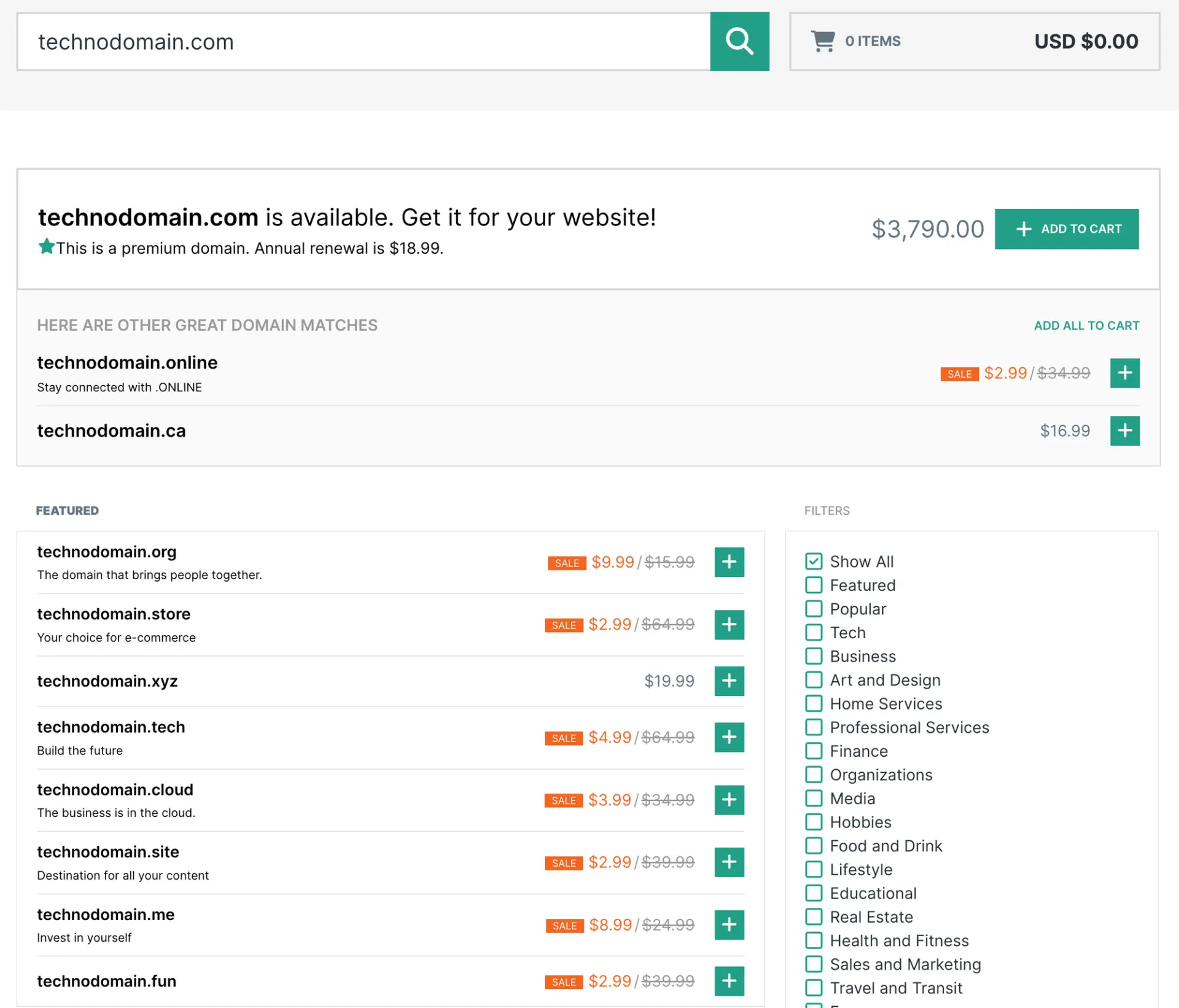
TLDs are overseen by the Internet Corporation for Assigned Names and Numbers (ICANN), the non-profit body that coordinates the global domain system. ICANN delegates responsibility for each TLD to specialized organizations called registries. VeriSign, for example, operates .com and .net, while national authorities manage country-code domains such as .ca through the Canadian Internet Registration Authority (CIRA).
Registries do not sell domains directly to the public. That responsibility belongs to registrars, companies accredited by ICANN or by the relevant national authority. When someone registers a name through a service like Hover or Namecheap, the registrar records that registration with the appropriate registry. The registrar manages the customer relationship, while the registry ensures that the domain is unique and published in the global DNS.
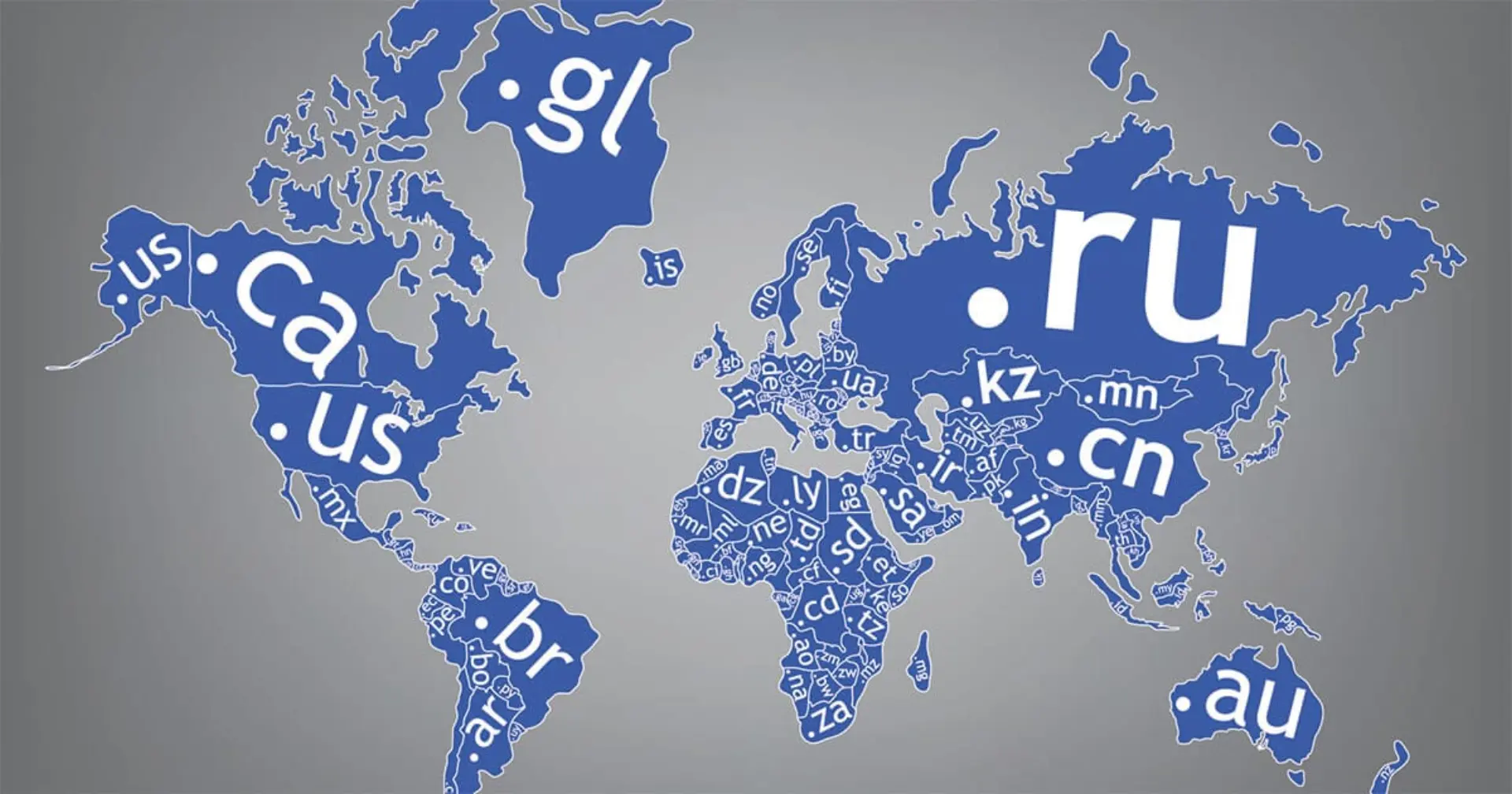
To the left of the TLD is the second-level domain, usually the word or phrase chosen by the registrant. In technodabbler.com, the second-level domain is technodabbler. Combined with the .com TLD, it forms a unique identity within the global namespace. Additional labels can be placed to the left, forming subdomains such as www.technodabbler.com or blog.technodabbler.com. These subdomains do not require separate registration and are configured through DNS records rather than through the registrar.
In this example, the registrant is the individual or organization that purchased technodabbler.com. The registrar is the company through which the registration was made, such as Hover or Namecheap. The registry is VeriSign, which operates the .com TLD and ensures that all registered names remain unique. Together, the registrant, registrar, and registry form the chain of responsibility that makes domain names work.
DNS Hosting
Registering a domain name is only the first step. On its own, a domain does not know where to point. To make it useful, the domain must be connected to a DNS hosting service. The DNS host is responsible for storing and serving the domain’s configuration to the rest of the Internet.
Although many registrars provide DNS hosting as part of their service, they are not the only option. Some website platforms, like Squarespace or Wix, bundle hosting with their packages. Others, such as Cloudflare or AWS Route 53, specialize in DNS hosting as a standalone service. It is also possible to self-host, though this is usually reserved for advanced users or organizations.
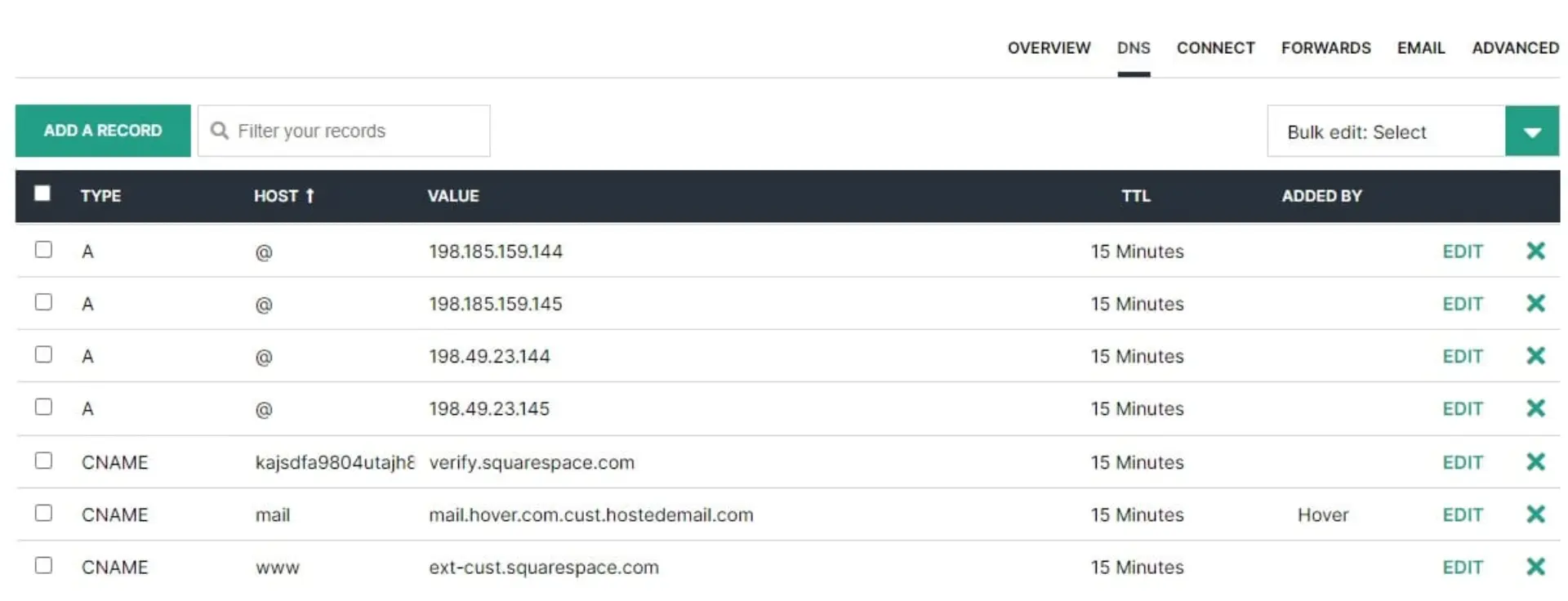
The information stored by a DNS host is organized into records. Each record tells the Internet how the domain should behave: which server hosts the website, where to deliver email, or how to verify security policies. These records form the authoritative source for the domain. When a lookup is performed, other DNS servers contact the DNS host to retrieve the answers.
Without DNS hosting, a registered domain is little more than a reserved name.
DNS Lookups
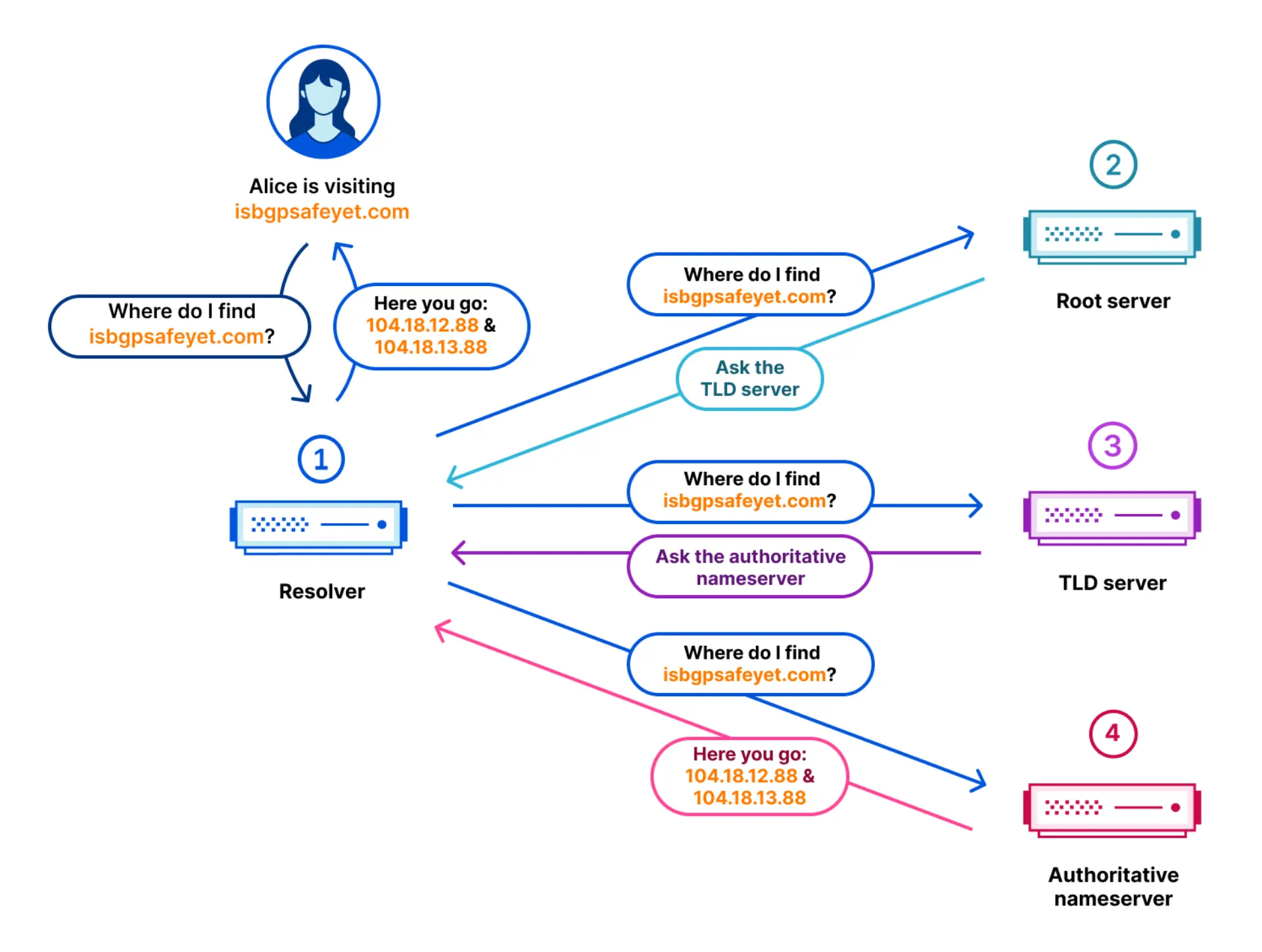
With the domain registered and hosted, the next step is resolution: finding the correct server when a user types a domain into a browser. This process is known as a DNS lookup. To see how it works, consider the example of a user entering www.technodabbler.com into their browser. The user’s computer is configured to use Google’s public DNS resolver at 8.8.8.8.
The first step is to check if the result is already cached locally. Both the operating system and the browser keep short-term caches to avoid repeating lookups. If the computer has already visited www.technodabbler.com, it may already know that the domain maps to the IP address 203.0.113.10. In that case, the lookup ends immediately and the browser connects to the website.
If the computer does not have the answer, the query is forwarded to Google’s DNS resolver. Google also maintains a large cache. If another user recently visited www.technodabbler.com, the resolver might already have the IP address 203.0.113.10 stored. The resolver then returns that cached result directly to the user, without contacting any other servers.
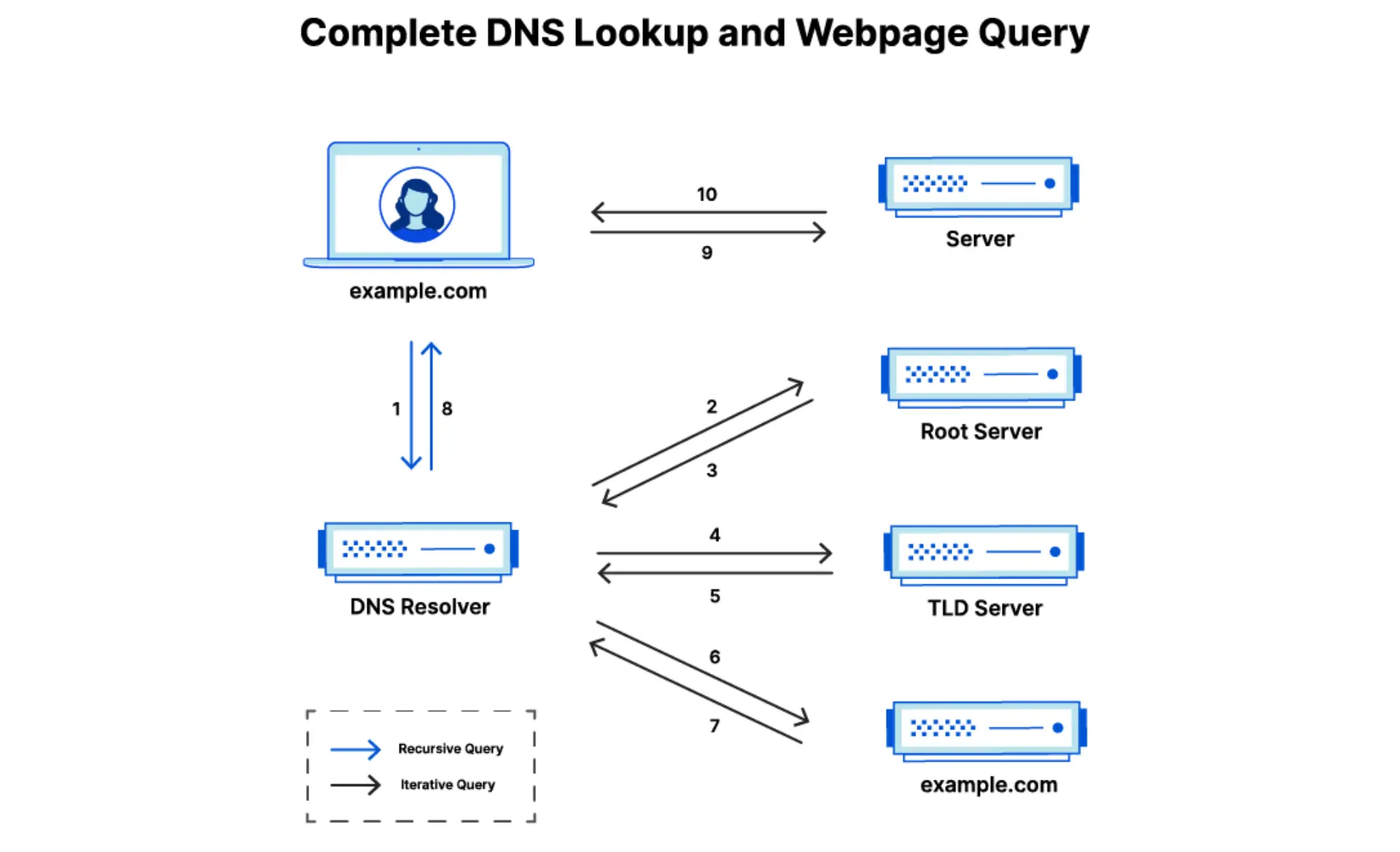
If the record is not in Google’s cache, the resolver begins a full query. It contacts one of the Internet’s root servers, which do not know individual domains but do know where to find the servers responsible for top-level domains such as .com. The resolver is then directed to the .com TLD servers, which in turn point to the authoritative DNS host for technodabbler.com. That authoritative server holds the record for www.technodabbler.com, which confirms the mapping to 203.0.113.10. The resolver stores this answer in its cache and returns it to the user’s computer, which can now connect to the website.
Caching is essential for performance and reliability. Without it, every lookup would involve contacting root servers and TLD servers for even the most common domains, overwhelming the system. However, caching comes with a disadvantage: when records are updated, cached results can linger until they expire. This is why changes to DNS, such as moving a website to a new host, can take hours or even days to appear consistently across the Internet. The time a record is allowed to remain in cache is controlled by the Time To Live (TTL) setting configured in the DNS host.
Through caching and hierarchy, DNS achieves both speed and resilience. Common queries are answered instantly, while less frequent ones follow a structured path from root servers to authoritative hosts. The result is a system that feels invisible when it works, but underpins nearly every interaction on the Internet.
DNS Root
At the very top of the Domain Name System is the DNS root. The root servers act as the entry point for all lookups, directing queries to the correct top-level domain (TLD) servers. They do not store individual domain names such as technodabbler.com, but they know which servers are responsible for .com, .net, .ca, and every other TLD.
There are 13 logical root servers, named A through M. Each one is operated by a different organization, including groups such as VeriSign, the Internet Systems Consortium, NASA, and several universities. Although there are only 13 logical roots, each server is replicated thousands of times worldwide using a technique called anycast. This ensures that users connect to the nearest available root, keeping latency low and improving resilience.
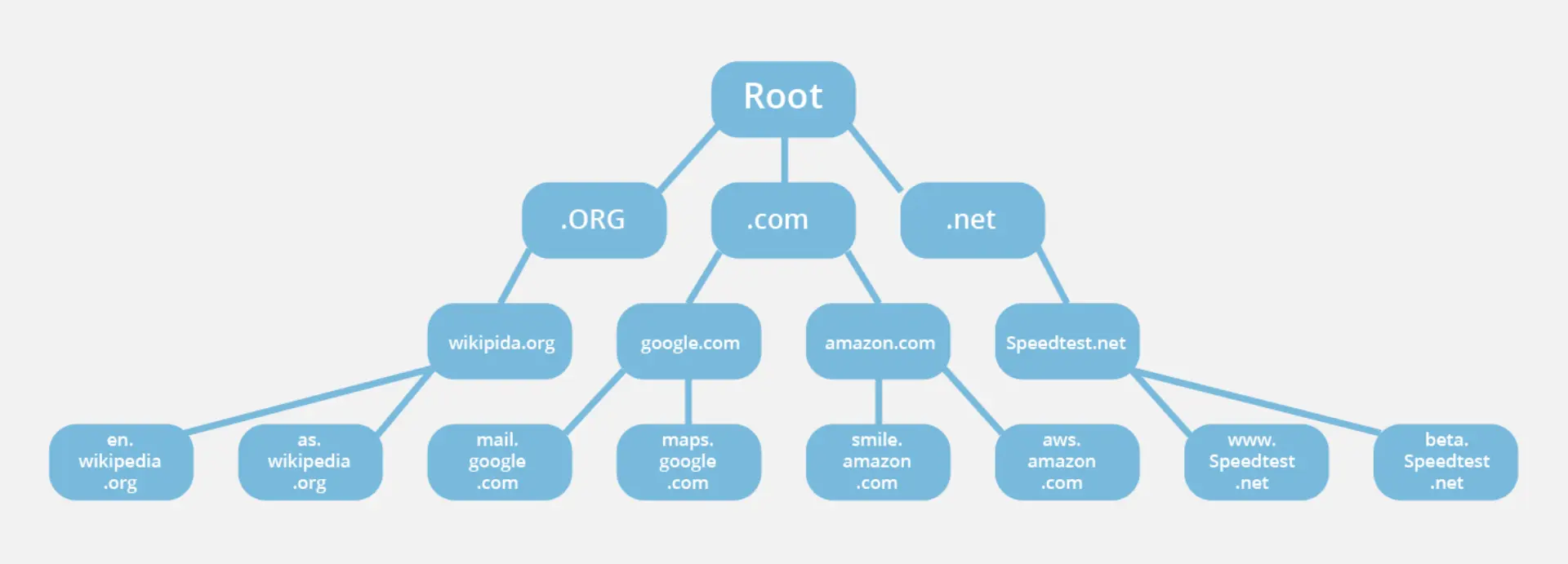
The system is coordinated by the Internet Assigned Numbers Authority (IANA), a function managed by ICANN. While no single government or company controls the root zone, its operation depends on international cooperation between the organizations that run the root servers. Together, they provide the foundation of trust and stability for the entire DNS hierarchy.
Without the root servers, no lookup could begin. By directing queries to the correct TLD, they serve as the cornerstone of a system that supports billions of Internet requests every day.
DNS Records
Every domain relies on DNS records to define how it should behave. These records are stored by the DNS host and represent the authoritative information about the domain. Each record serves a specific purpose, from directing web traffic to verifying security policies.
The most common record types are:
- A Record – Maps a domain name to an IPv4 address. For example, www.technodabbler.com might point to 203.0.113.10. The IPv6 equivalent is the AAAA Record.
- CNAME Record – Creates an alias from one domain to another. For example, blog.technodabbler.com could be a CNAME pointing to sites.example.com.
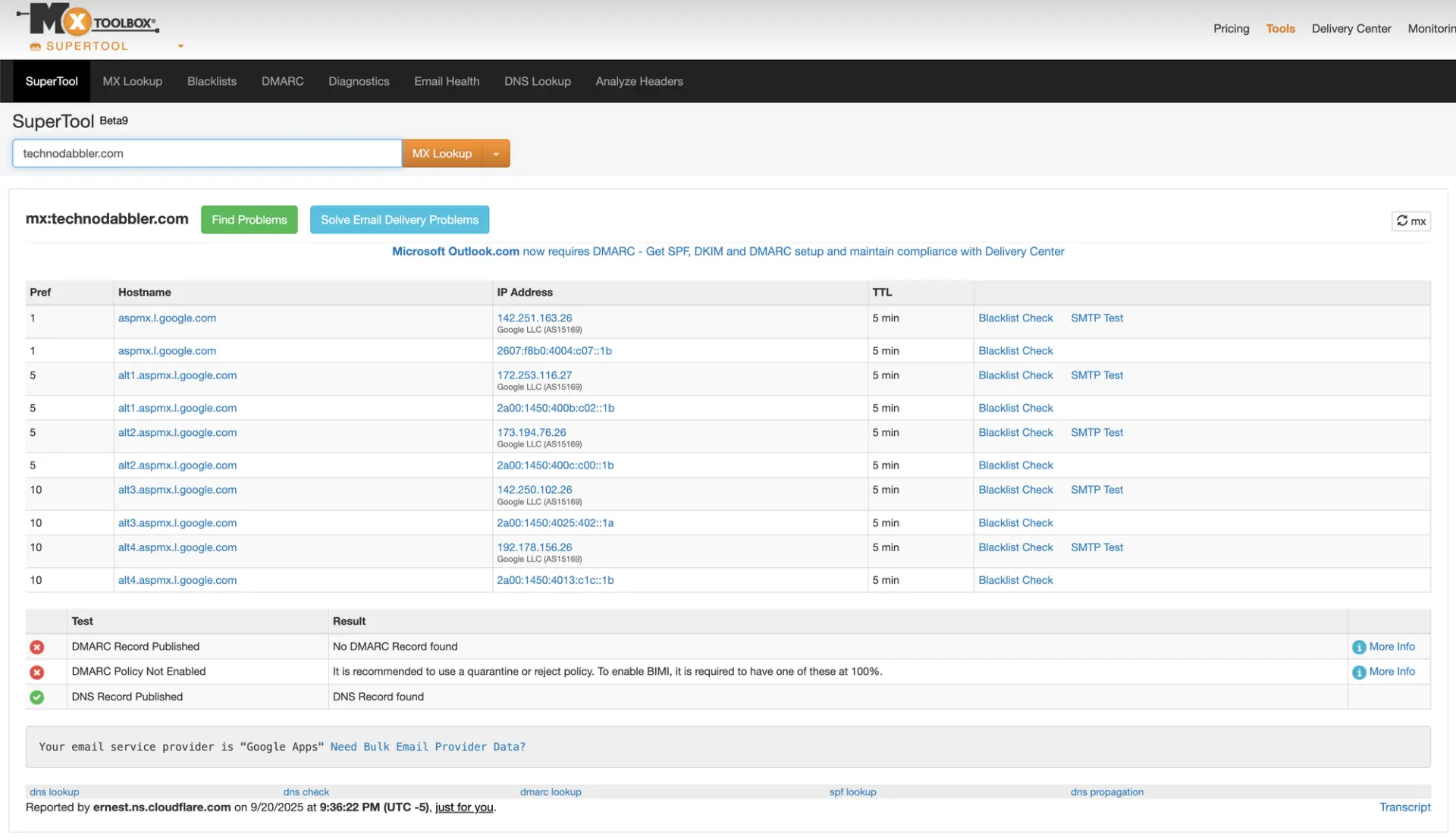
- MX Record – Defines the mail servers responsible for handling email for the domain. Multiple MX records can be used with priorities to provide redundancy.
- TXT Record – Stores text information. Although originally meant for human-readable notes, TXT records are now commonly used for verification (e.g., proving domain ownership) and for email security frameworks such as SPF, DKIM, and DMARC.
Other record types exist, but these four cover the majority of everyday use cases. Together, they allow a single domain to support websites, email, subdomains, and various forms of authentication.
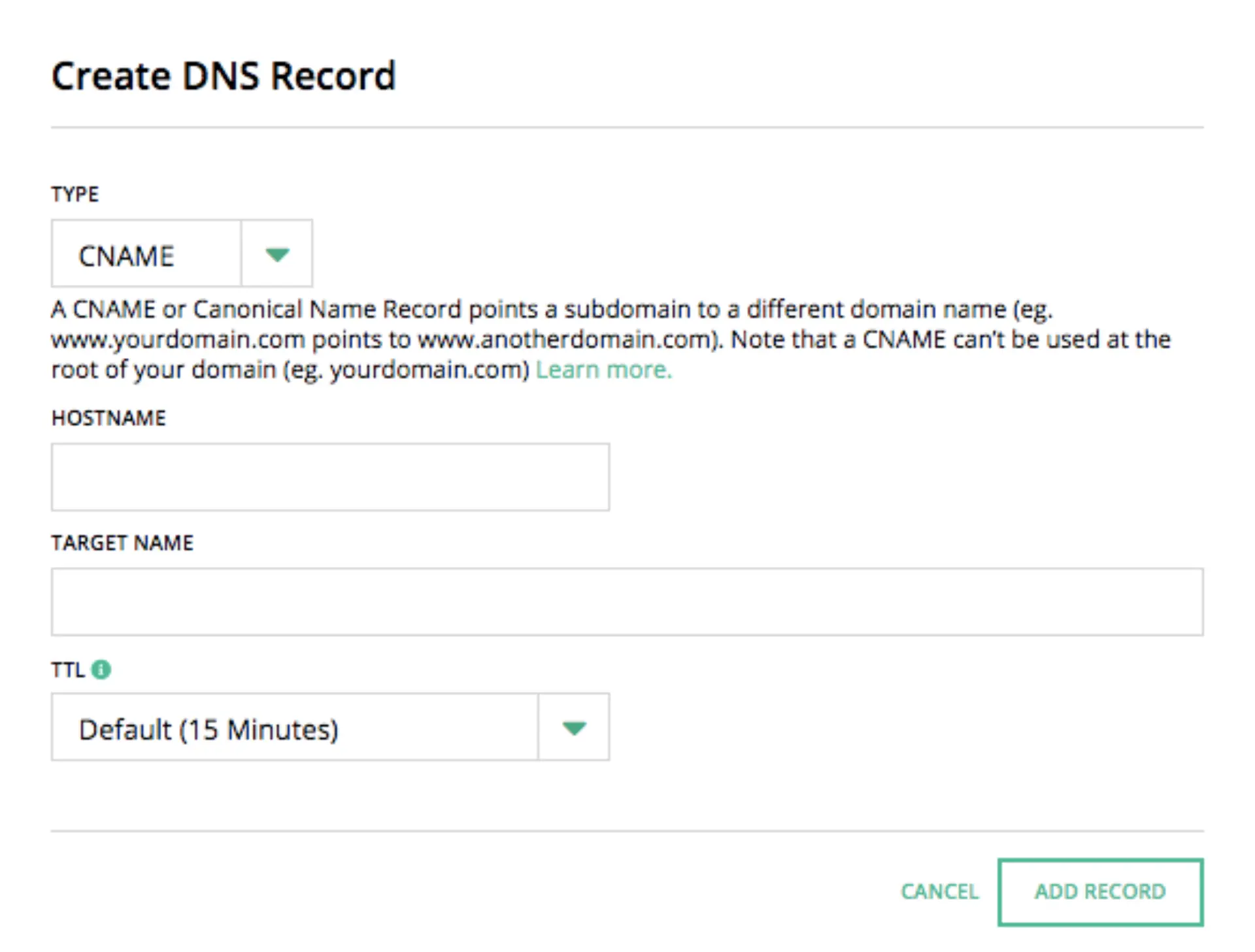
The way these records are distributed across the Internet is affected by caching and TTLs (Time To Live). Each record includes a TTL value that defines how long it can be stored in caches before a fresh lookup is required. A short TTL allows changes to propagate quickly but increases lookup traffic, while a long TTL improves performance but delays updates. Choosing the right balance depends on how often a domain’s configuration is expected to change.
Misconfigured or outdated records are a common source of downtime. From unreachable websites to lost email, small mistakes in DNS records can have large consequences — another reason behind the saying, “It’s always DNS.”
Modern DNS
The Domain Name System is one of the oldest components of the Internet still in daily use. It was first defined in the early 1980s as a way to replace the manually maintained hosts.txt files that computers once relied on to map names to addresses. Despite being over forty years old, DNS remains central to how the Internet functions. Its layered hierarchy and caching mechanisms have proven remarkably resilient.
That said, the modern Internet has introduced new challenges that the original designers never anticipated. Security, privacy, and surveillance concerns have driven the development of extensions to make DNS more robust. DNSSEC (Domain Name System Security Extensions) adds cryptographic signatures to DNS records, allowing resolvers to verify that responses have not been tampered with. While adoption is uneven, it represents an important safeguard against certain types of attacks.
Another area of innovation is privacy. By default, DNS requests are sent in plain text, making it easy for anyone on the network path to see which sites a user is visiting. To address this, technologies like DNS over HTTPS (DoH) and DNS over TLS (DoT) encrypt DNS queries, protecting them from eavesdropping or manipulation. Providers such as Cloudflare, Google, and Quad9 all support these encrypted protocols.
The age of DNS is part of its strength. Its core design has endured for decades, adapting through extensions rather than being replaced outright. Modern enhancements like DNSSEC and encrypted lookups ensure that this foundational system continues to meet the needs of today’s Internet, just as it did in the early days of dial-up.
DNS Tools
Because DNS is so fundamental, a wide variety of tools exist to help troubleshoot and inspect it. Whether verifying that a new record has propagated or investigating why a service is unreachable, these tools provide a window into the otherwise invisible workings of the Domain Name System.
One of the oldest and most widely used is WHOIS, a protocol that retrieves information about domain registrations. A WHOIS query can reveal the registrar, the registry, and in some cases the contact information for the registrant. While privacy protections such as GDPR have reduced the amount of personal data exposed, WHOIS remains a useful way to confirm who manages a domain.
For looking directly at DNS records, the classic command-line tool is dig. A simple command such as dig www.technodabbler.com shows the A record returned by the authoritative server. With additional options, dig can display entire zone files, trace queries step by step, or test specific record types like MX or TXT. It remains the gold standard for DNS debugging.
Graphical and web-based tools offer more accessible alternatives. Utilities built into operating systems, such as nslookup on Windows, provide basic lookup functions. For those who prefer not to use the command line, sites like MXToolbox make it possible to run queries directly from a browser. MXToolbox in particular is popular among administrators, as it combines DNS lookups with related checks for email configuration, blacklists, and performance testing.
DNS Conclusion
If you have made it this far, you have seen why DNS is both feared and respected by administrators. It is old, complex, and at times frustrating, yet it remains one of the most resilient systems on the Internet. DNS quietly translates names into numbers billions of times a day, making the modern web possible.
For home users, it is an invisible helper that can be tuned for speed, privacy, or safety. For domain owners, it is the system that connects a name to websites and email. For operators and administrators, it is a foundation of reliability that requires constant vigilance. And when something breaks, the old saying proves true: it is always DNS.
Have you ever had a problem that turned out to be “just DNS”? Share your stories or troubleshooting lessons in the comments below. If you enjoyed this deep dive into DNS, you might also be interested in our exploration of object storage with S3.


